
I’ve spent years helping students fix their APA 7 format title page mistakes.
Trust me, that one formatting error can make your hard work look sloppy before anyone reads a single word.
The title page isn’t just decoration. It’s your research paper’s first impression, and you can’t afford to mess it up.
Let me walk you through the exact rules, shortcuts, and insider tips I’ve learned from formatting hundreds of academic papers.
- The APA student title page uses standardized formatting: 12-point Times New Roman, double spacing, and left-aligned text throughout the paper.
- A strong academic title should be concise, specific, and clearly reflect the purpose of the research.
- Running heads are not required for student papers in APA 7, but page numbers must always appear in the top-right corner.
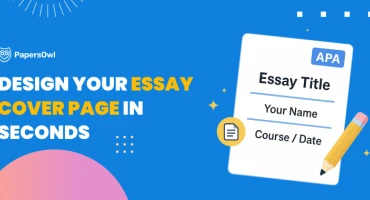
- Every title page includes core elements: title, author name, institutional affiliation, course information, and due date — all centered and properly spaced.
- Consistency in formatting (spacing, alignment, and structure) directly impacts how professional and credible the paper appears.
APA Formatting Guidelines
The APA 7 format title page requires specific font, size, alignment, and spacing rules.
If you’re wondering how to format APA title page, you can’t “eyeball it” and hope for the best — professors notice these details immediately!
Professional papers demand consistency. The student’s title page follows strict guidelines to maintain academic standards.
Font size
I recommend using font size 12 for your title page.
Font size 11? Not suitable here.
Some students think going smaller makes their work look “sophisticated” or saves space.
Wrong move.
Smaller fonts just look amateurish and hard to read.
Bigger fonts? Even worse — it screams, “I’m trying to stretch my page count.”
Stick with 12. Always.
Font style
Times New Roman is the standard. Period.
Most academic institutions require this font style, and professors expect it without question.
If you’re learning how to make a title page in APA format, don’t experiment with fonts like Arial, Calibri, or Georgia, or anything “modern” or “creative.” This isn’t a branding project or a creative design showcase.
Save your creativity for your analysis, not your font choice.
Alignment
Align the text in your paper’s body against the left margin. The right margin stays ragged — don’t justify it.
Even if you’re using a research paper writing service to handle the heavy lifting, always double-check alignment yourself. It’s one of those details that separates good papers from great ones.
Trust me, professors notice when text alignment is off.
Spacing
Double-spacing is mandatory for every single section of your APA-style paper. No exceptions whatsoever.
Remove any extra space before or after paragraphs — Microsoft Word loves sneaking those in automatically, so watch out.
I’ve seen students lose points just because they forgot to check paragraph spacing settings in their document properties. Don’t let that be you.
How Do I Choose a Title?
Here’s the thing: you probably already have a topic. The real challenge?
Making it sound professional enough for academic work without turning it into a boring word salad that nobody wants to read.
Especially when you’re also figuring out how to do an APA title page correctly.
A title should be concise yet informative. It needs to tell readers exactly what your research is about without turning into a full sentence or mini-paragraph.
Aim for 12 words maximum.
Here’s my exact process for crafting strong titles:
- Understand your topic sentence. What’s the core idea you’re exploring?
- Define your research aim. What are you trying to prove, explore, or analyze?
- Draft multiple titles. I usually write 3–5 variations before settling on one. Write them down, sleep on it, then pick the best.
- Pick the most professional option or run it by your supervisor for feedback. Fresh eyes always help catch awkward phrasing.
Formatting author names and institutional affiliations
If you have two authors, use an ampersand (&) to separate their names. Simple enough.
For multiple authors, list only the last name of the first author, then add “et al.” to indicate others.
Don’t list everyone in the text — that’s what the author note section is for.
For institutional affiliations, identify where the research took place. If multiple institutions contributed, include dual affiliation.
What’s critical here: the institutions must have tangibly contributed to the research, not just provided office space.
If your affiliation changes mid-project (say, you transferred schools), note it in the author’s section at the bottom of the page.
Title Page Elements
The main elements of an APA 7 title page include the page number, the paper title, the author’s name, and the institutional affiliation.
If you’re unsure how to create a title page in APA format, let me walk you through each one in detail so you never second-guess yourself again.
Title of the paper
Your title page sets the tone for your entire paper. Following the appropriate format can help you come up with a good research paper title and make sure that your work is taken seriously from the start.
Every APA-style paper needs these important parts:
- Page number (top right corner, header area).
- Paper title (centered, bold, middle of the page).
- Author name (centered, your full name below the title).
- Institutional affiliation (centered, your university name).
- Course instructor (centered, professor’s name).
- Due date (centered, submission deadline).
Here are visual examples of APA 7 title pages:
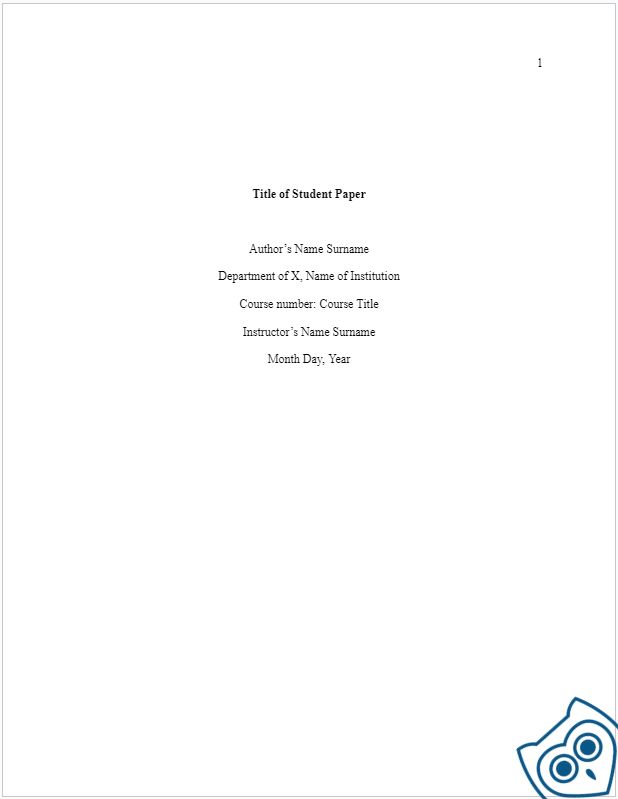
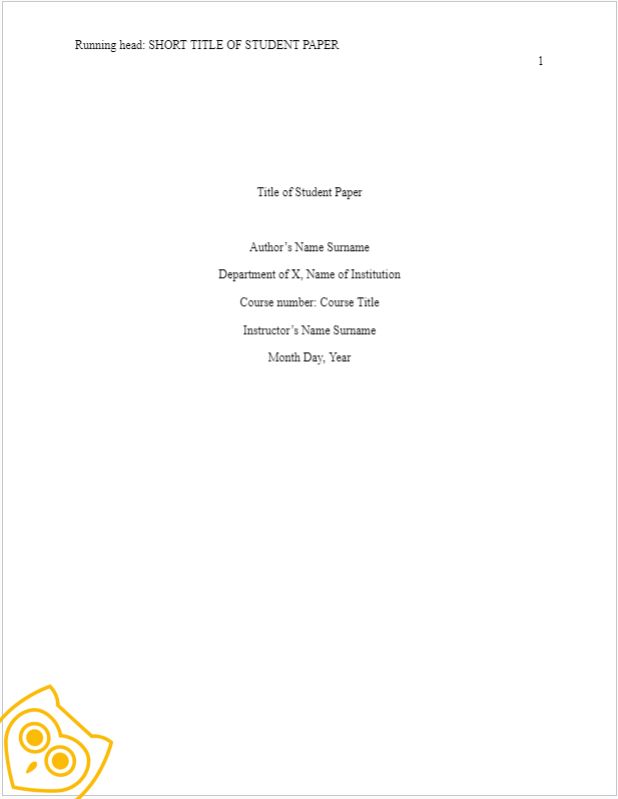
Their examples shows exactly how the page should look with space, alignment, and positioning of elements.
Once you understand how to make an APA title page, I always recommend keeping a template handy to avoid formatting mistakes when you’re under deadline pressure.
You should do the same — save yourself the stress.
Author’s name
Including your name on the APA format title page acknowledges your effort. It also helps readers easily trace your publication if it is later cited.
For unpublished student works, you can add the course number and name right on the front page. Simple and straightforward.
Running head and page number
Page numbering in APA style papers (7th ed.) follows standard rules across formatting styles. The title page gets numbered too — it’s page 1, always.
Page numbers appear in the upper-right corner of the header using Arabic numerals.
- Don’t use Roman numerals like i, ii, iii.
- Don’t skip the title page in your numbering sequence.
Just number everything consecutively, starting from 1.
The rule for running head in an APA research paper is straightforward: the short version of your title can’t exceed 50 characters, including spaces.
Now, here’s where the 7th edition changed things significantly.
The running head rules depend on your paper type:
- Student Papers. You don’t need a running head. Just include the page number in the top right corner of each page. That’s it. I can’t tell you how many students waste hours adding running heads when their assignment doesn’t require them.
- Professional Papers. If you’re submitting a manuscript for publication (like a journal article or thesis for publication consideration), you still need a running head. It appears in the top header of each page, aligned left, in all caps. It’s a shortened version of your paper’s title that helps identify pages if they get separated.
Institutional affiliation
Institutional affiliation is mandatory for academic papers, especially if you’re aiming for publication later.
Include these details clearly:
- Department name (if applicable).
- University name (full official name).
- Author name(s) (listed above).
Keep it clean and professional.
No need for street addresses, ZIP codes, phone numbers, or email addresses unless your institution specifically requires them for publication purposes.
Course information and instructor name
Course information helps readers quickly understand your subject area. Keep it short and focused.
Sometimes it includes your department and university, sometimes just the course code and title. Either way, it shouldn’t exceed 50 characters total.
I always add the instructor’s name to acknowledge their guidance throughout the research process.
More than just recognizing their experience during your research, adding their name boosts your work’s credibility significantly. It shows you didn’t work alone; you worked under supervision.
That is important to academic readers who are judging your methodology.
Due date
The deadline date is when your study is due. It could be the date you turn in your work or the date you have to finish it.
It helps people comprehend the timeline of your project and how it compares to other publications that came out around the same time.
Use your country’s standard format to write the month, day, and year. This is how to format it correctly:
“September 23, 2023”
OR
“23 September 2023”
Pick one format and stick with it throughout your paper. Consistency matters more than which specific format you choose.
Author note
The author’s note sits at the bottom half of the APA title page, below the title, authors, and affiliations.
It provides additional context readers need, including data-sharing policies, study registration details, conflicts of interest, disclaimers, and funding sources.
Some notes include financial support or grant information received during research. This transparency is necessary for professional papers submitted for publication.
For student papers, check with your instructor — it’s often optional unless you received funding or have conflicts to disclose.
Finishing on a High Note
Proper formatting of the title page is essential for a professional-looking research paper. The title page sets the tone for everything that follows.
A solid research paper includes all the basics executed flawlessly:
- the author’s name,
- institution affiliation,
- course information,
- due date,
- author note, when applicable.
Struggling to follow these guidelines perfectly?
You might consider services that write a research paper for me, ensuring every element — running head, page numbering, formatting, spacing — is executed perfectly in accordance with APA 7th edition standards.
Being a great writer means following guidelines and consistently mastering proper formatting. It’ll make you a better student and bring you closer to having published work that other researchers cite.