
A bad resume can quietly ruin your chances before you even meet a recruiter. In a competitive job market, hiring managers often decide within seconds whether to keep reading.
When I review bad resume examples, I usually see the same problem: the CV is hard to scan and doesn’t show the candidate’s value.
- Recruiters spend a few seconds during initial recruiter reviews.
- Weak resumes fail because they are cluttered or full of irrelevant details.
- Fixing common mistakes can greatly improve your job application.
In this guide, I’ll analyze the most common mistakes and demonstrate how to fix them.
What Makes a Resume Ineffective in 2026?
A famous rule in recruiting is the 6-second rule. During the first pass, recruiters quickly scan a document for a job title, relevant skills, and professional history.
If they cannot find these immediately, the CV rarely survives the first review.
In my years advising job seekers, I have seen many talented people lose interviews because their resume failed this first scan.
A bad résumé example usually suffers from several common problems:
- cluttered layout;
- poor structure;
- too many irrelevant skills;
- weak descriptions of achievements;
- missing applicable skills.
Recruiters are not reading a story — they are scanning for signals.
They want to quickly see career progression, a well-thought-out skills section, proof of results, and alignment with the specific job posting.
If these signals are hidden inside dense paragraphs or buried under decoration, the resume fails.
What Does a Bad Resume Look Like? 10 Examples and Lessons Learned
Let’s see the examples of common mistakes collected from public resume guides and recruiting resources. Each example includes an explanation and guidelines for fixing it. For instance, many candidates list advanced data analysis as a skill, but their actual experience doesn’t match up. If you struggle with spreadsheet tasks during your studies, it’s better to pay someone to do my Excel homework to truly learn the right formulas rather than risk putting false skills on your CV.
1. The “Wall of Text” Nightmare (Formatting)
This resume has long paragraphs instead of bullet points. Experience sections read like essays.
Here is an example structure I often see in a sales manager’s resume:
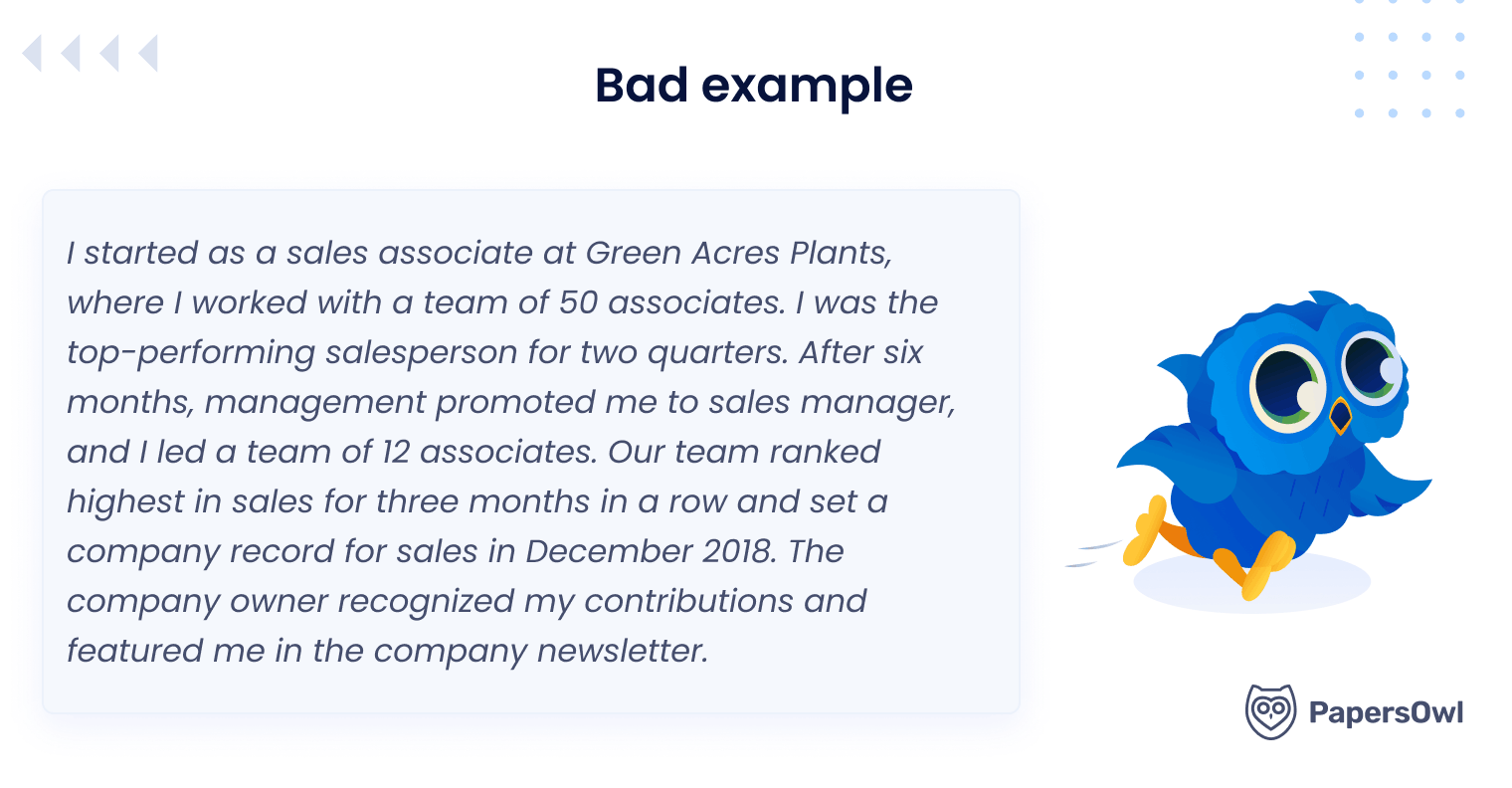
Why is it a failure? Recruiters cannot quickly scan paragraphs.
Large text blocks hide achievements and slow down reading. Dense formatting increases the chance that key results will go unnoticed.
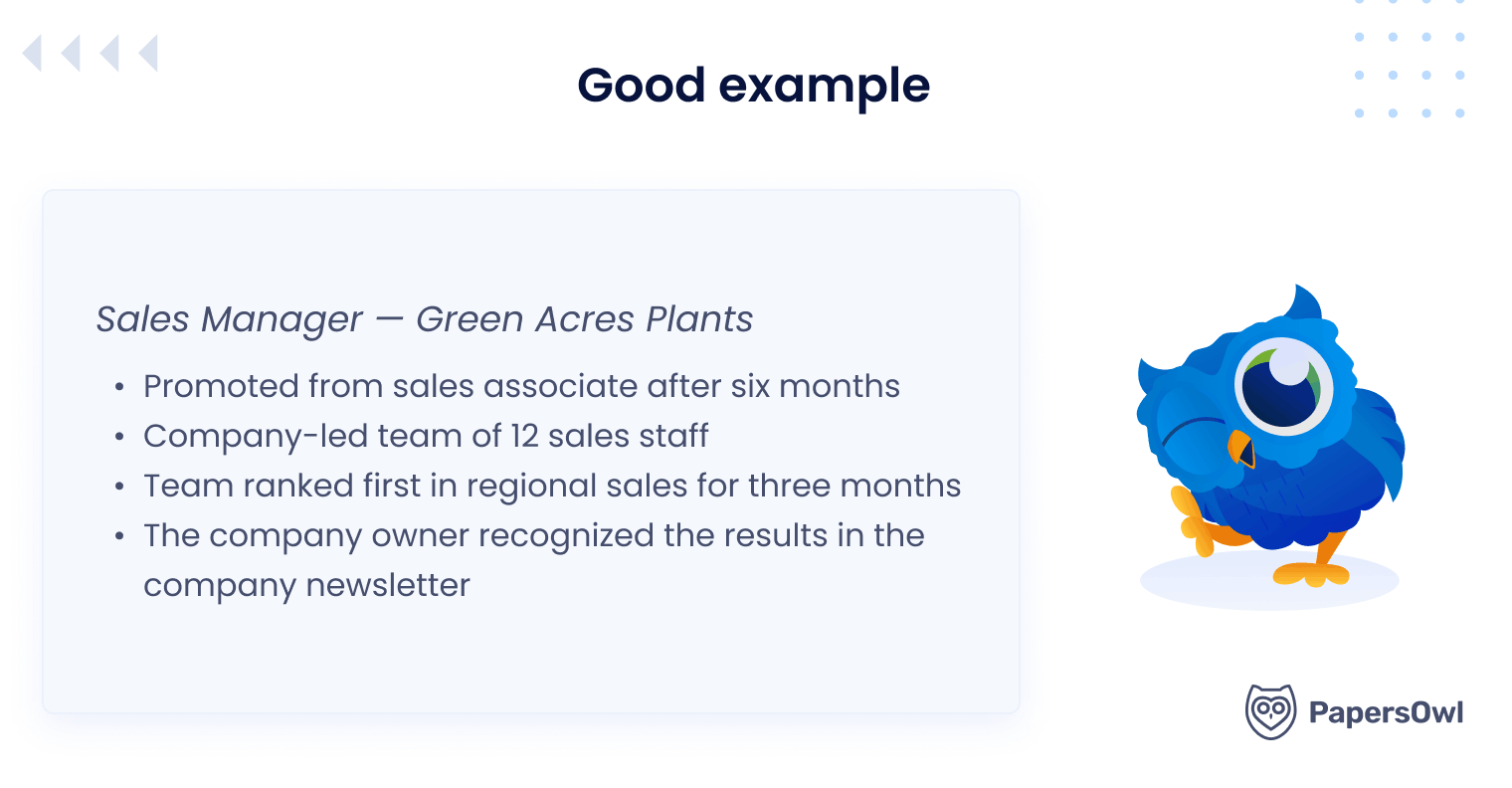
To fix this bad CV example, I recommend using bullet points and leaving sufficient blank space so the text is easy to scan.
2. The Unprofessional Contact Info
Many students still use an unprofessional personal email address when applying for jobs. I often see examples like:
- gamerboy@email
- partyqueen@email
- skaterboy@email
At first glance, this may seem harmless, but it can weaken a candidate’s profile.
When I review student applications, I immediately notice when the contact section looks informal. Sometimes resumes also miss useful links such as LinkedIn profiles or portfolios.
This becomes a problem because first impressions matter. Recruiters expect clear, professional contact information. A simple change can make a big difference!
I usually recommend creating a professional address such as firstname.lastname@email. It looks clean and easy to remember.
I also suggest adding relevant links whenever possible:
- LinkedIn profile;
- portfolio;
- personal website.
This is especially important for creative and technical roles.
For example, when I review a web designer’s resume or applications for coding-related roles, I expect to see examples of real work online.
3. The “Jack of All Trades” Resume
This type of bad resume examples includes everything a student has ever done. Barista experience, tutoring, science courses, and random activities appear together.
Why is it a mistake? Recruiters want alignment with the specific job.
For example, applying for marketing while highlighting physics courses from a demanding undergraduate major creates confusion.
Let’s consider this example.
While the experience is broad, recruiters often see this type of CV as a lack of focus, which makes it harder to understand the candidate’s key professional direction.
To improve this document, it’s crucial to tailor the CV to the job posting. I’d rather focus on relevant skills and remove irrelevant or expected ones that don’t relate to the role.
A resume should show clear career progression and direction.
4. The Graphic Designer’s Overkill
A poorly designed resume uses:
- bright, inconsistent color palettes;
- decorative fonts such as Papyrus or other novelty typefaces;
- skill charts, progress bars, and visual graphs;
- numerous icons replacing bullet points;
- text placed inside shapes or images;
- multiple text boxes and inconsistent margins;
- center-aligned blocks that create an unbalanced layout.
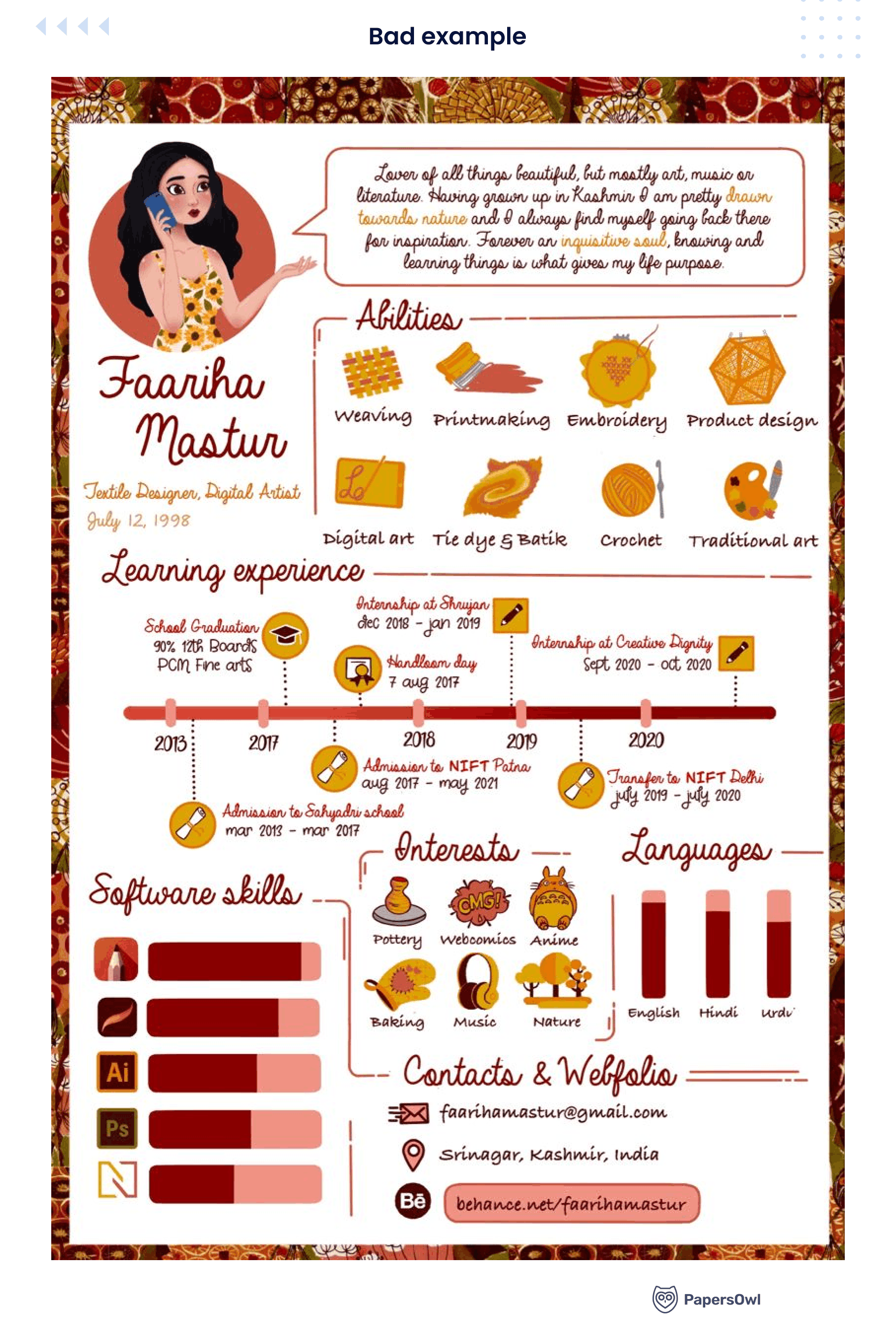
Many templates created in design tools look beautiful at first glance, but they often cause serious problems during the hiring process.
Some resumes become so overloaded with graphics that they almost look like the worst resumes ever, rather than professional documents.
Many large companies use an applicant tracking system (ATS) to scan applications. These systems often struggle to read charts, icons, and text placed inside shapes, as explained in this article about infographic resumes.
So, a poorly designed resume can become invisible to the system.
Instead, use a simple resume template created in a word processing program. Recommended fonts:
- Arial;
- Calibri;
- Helvetica.
Avoid decorative formatting and keep the layout clean and readable.
5. The “I, Me, Mine” Tone
Some resumes rely too much on personal language and subjective statements.
For example, “I am a detail-oriented candidate seeking a challenging opportunity.”
While it sounds positive, recruiters usually prefer just facts over personal descriptions. A CV should focus on professional results and responsibilities rather than emotions or self-promotion.
A better approach is to write in a concise and focused style. Instead of emphasizing the person, highlight the work’s results.
| Less effective | Stronger |
|---|---|
| I managed a team and helped projects succeed | Managed a team of 10 and delivered 5 projects on schedule |
| I am a hardworking and motivated employee | Increased customer satisfaction scores by 22% |
| I improved team performance | Improved team performance by 18% within six months |
6. The Ghost of Experience
Some resumes describe only responsibilities, for example:
- responsible for sales;
- managed customer relations.
But they fail to show measurable results!
When comparing examples of good and bad resumes, you can see that strong resumes focus on achievements rather than just listing tasks.
Why is it a mistake? Responsibilities describe what the job entails, whereas achievements show the impact. Remember that recruiters want a proven track record.
So, use measurable results.
Examples:
- Increased website traffic by 40 percent through SEO strategy.
- Implemented accounts receivable management system, reducing overdue invoices by 25 percent.
7. Excessive Use of Keywords
Some candidates try to fool the applicant tracking system by adding massive keyword lists:
- excel proficiency;
- advanced QuickBooks skills;
- marketing;
- analytics;
- coding.
Still, recruiters quickly notice when skills listed do not match experience.
I recommend using a focused skills section that highlights relevant skills aligned with the job description. Avoid clichés like team player, managed, or assisted, and aim for keywords that truly show your impact.
8. Irrelevant Hobbies
I often come across examples of bad resumes that describe hobbies in great detail, such as a love of cats, gaming achievements, travel stories, etc.
Still, this creates too much irrelevant info and distracts from professional history.
A better idea is to include hobbies only if they support the job.
9. The Typo Trap
As I see, spelling errors are surprisingly common. For example:
- “Attension to detail” instead of “Attention to detail”
- “Managment experience” instead of “management experience”
To avoid typos in your CV, always check grammar, proper spelling, and formatting. For this, you may:
- use Grammarly;
- do built-in spell check;
- read the document aloud;
- ask someone to review your application documents before submitting them.
Remember that errors undermine credibility. Hiring managers can assume that careless work habits are present.
10. The Ancient History Problem
Some students include achievements from childhood or school activities that are no longer relevant.
For example, a college graduate might mention winning a middle school science fair or leading a junior sports team.
Why is this not the best idea? A resume should focus on recent educational and professional history.
A better approach is to organize information in reverse chronological order so the most relevant achievements appear first. Try to focus on experiences that demonstrate practical skills and career development.
Examples of relevant content I suggest to include:
- internships and part-time jobs related to the fiel;
- university research projects or coursework;
- volunteer work connected to professional skills;
- industry certifications or technical training.
For instance, a physician assistant candidate should emphasize clinical rotations, patient care experience, and medical procedure performance rather than outdated school activities.
The Difference Between a Good vs Bad Resume
| Bad resume | Good resume |
|---|---|
| Objective statement | Compelling professional summary |
| Dense paragraphs | Bullet points |
| Generic skills | Replace generic skills with measurable abilities |
| Too many irrelevant skills | Focused skills section |
| Random experiences | Clear career progression |
| Poor formatting | Clean resume template |
Effective Steps to Strengthen Your Candidate Profile
Let me share a process I often teach students and young professionals who feel stuck in their job searches.
Many people think improving a CV requires a complete rewrite.
In reality, a few focused changes can transform a weak document into a compelling one that hiring managers can quickly understand.
Step 1. Use a Clean Template
Start with a simple resume template created in a basic word processing program. I always recommend clear structure over visual creativity.
Recruiters scan documents quickly, so the layout must help them find information within seconds.
I also advise students to keep fonts simple. Arial or Calibri works perfectly.
Fancy fonts or complex designs may confuse an applicant tracking system, reducing the likelihood that your resume passes the initial screening.
When reviewing bad examples of resumes, you often see decorative fonts and overly complex formatting that make the document difficult for both software and recruiters to read.
Step 2. Demonstrate Quantifiable Results
Numbers immediately make your experience more convincing.
When I review resumes, I always look for measurable results because they show real impact.
A helpful rule I share with students is a simple formula:
Action Verb + Number + Result
This structure makes your achievements clear and easy for hiring managers to understand.
Instead of writing vague descriptions, show details:
- Managed a marketing budget of $200,000;
- Increased sales by 20 percent in one year;
- Reduced operating costs by 15 percent through process improvements.
Even small achievements matter.
For example, a student working as a sales associate could write that they helped increase weekly sales or improved customer satisfaction scores.
Step 3. Tailor Your Career Summary for Every Job.
One of the biggest resume mistakes I see is sending the same document to every employer.
In a competitive job market, that rarely works. A resume should match the specific role and company, not look generic or random. Otherwise, it can feel as out of place as a My Little Pony resume in a serious hiring process.
Before submitting a job application, read the job description and identify the expected skills and responsibilities. Then adjust your CV to align with the specific position.
For example, if the job posting emphasizes coding skills, highlight projects where you used those tools. If the role focuses on management, provide examples of how you led teams or coordinated projects.
Step 4. Proofread
Never submit a resume without careful proofreading. Even strong candidates miss out on opportunities because of minor grammar or formatting errors.
I recommend three simple checks:
- Run the document through a grammar tool such as Grammarly.
- Read your resume aloud. This helps catch awkward phrases.
- Ask a friend or mentor to review your own application documents.
A fresh pair of eyes often notices mistakes we miss. So, this simple step will give you confidence that your document looks polished and professional.
Key Guidelines on How to Pass the ATS
Many large companies now use an applicant tracking system (ATS) to filter job applications before a human even reads them. The software scans CVs and searches for keywords connected to the job title, the job description, and relevant skills.
When I review rejected resumes, I often notice technical problems that prevent them from being read correctly, such as:
- graphics and decorative icons;
- text placed inside images;
- unusual or decorative fonts;
- complex layouts with columns or charts.
To improve the chances that your resume passes through the system, it’s better to:
- Use clear formatting created in a basic word processing program.
- Match important keywords from the job description.
- Avoid overly complex design or heavy graphics.
Think of ATS software as the first gatekeeper of your dream job. If the system cannot read your document clearly, even strong candidates may be filtered out.
I often remind students that many terrible resumes fail not because of experience, but because the document is technically unreadable to the software.
Final Thoughts
A resume is not a biography. It is a marketing document with a simple purpose: to show potential employers why you deserve an interview.
A weak resume hides your strengths, whereas a strong resume highlights relevant skills, a professional history, and personal achievements.
When you revise your resume regularly during a job search, you gradually build stronger application documents that bring you closer to the career you want.
Still, if it is challenging, PapersOwl can always help with completing a resume, improving structure, and offering useful recommendations to make it stronger and more effective.